R-TECK School Book a demo

School management for Ugandan schools · nursery to A level

From the gate at 6:30 to the last roll call at night.

R-TECK School runs the whole school day on one system. The office works on a computer. Teachers, the matron, the nurse, the gate and the canteen use light phone apps that open in seconds and keep working when the network drops.

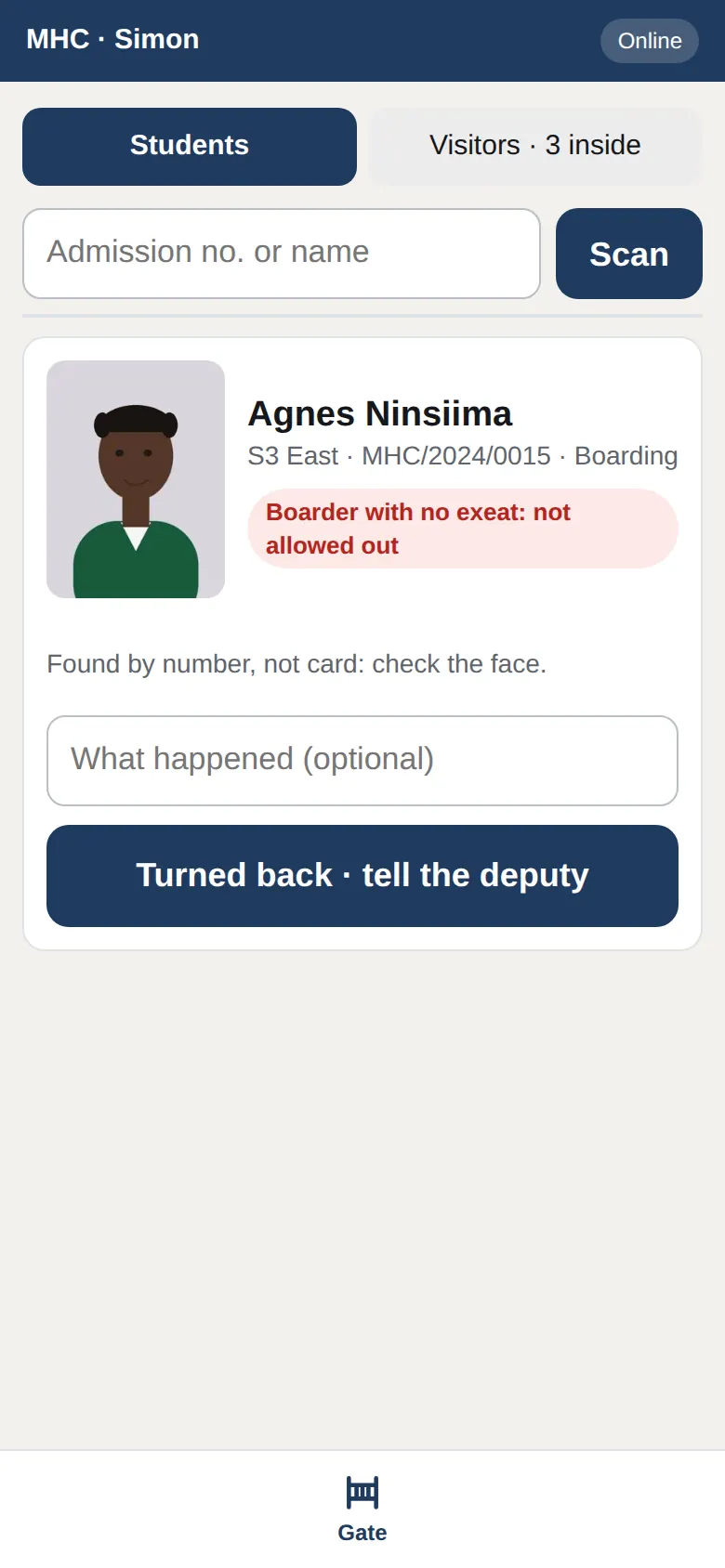
The gate screen on a guard's phone: a boarder's photo and the verdict, no exeat, not allowed out
06:30, the gate. The guard's phone shows the student's photo and whether they may leave.
36 KBthe teachers' phone app on its first visit: about 3 seconds on slow 3G. The full office system would be about 6 MB.
1 stepto bill a whole school for the term. Our demo school billed 236 students UGX 155,950,000 at once.
Every levelUNEB grading for nursery, P1 to P7 with PLE aggregates and divisions, the new lower secondary curriculum, and UACE.

The gate · security guard

No child leaves without permission.

The guard scans the student's ID card, or types the admission number. The phone shows the student's photo, the class, and whether they may leave: an approved exeat, day-scholar hours, or a trip.

When an exeat is approved, the parent is texted a six-digit pickup code. Whoever comes to collect gives the code and their ID number, and both are recorded. Visitors sign in on the same phone.

  • ID cards carry a signed QR code. A made-up card fails the check, and a card replaced after a loss stops working.
  • The phone locks when it is left idle. The guard's PIN opens it.
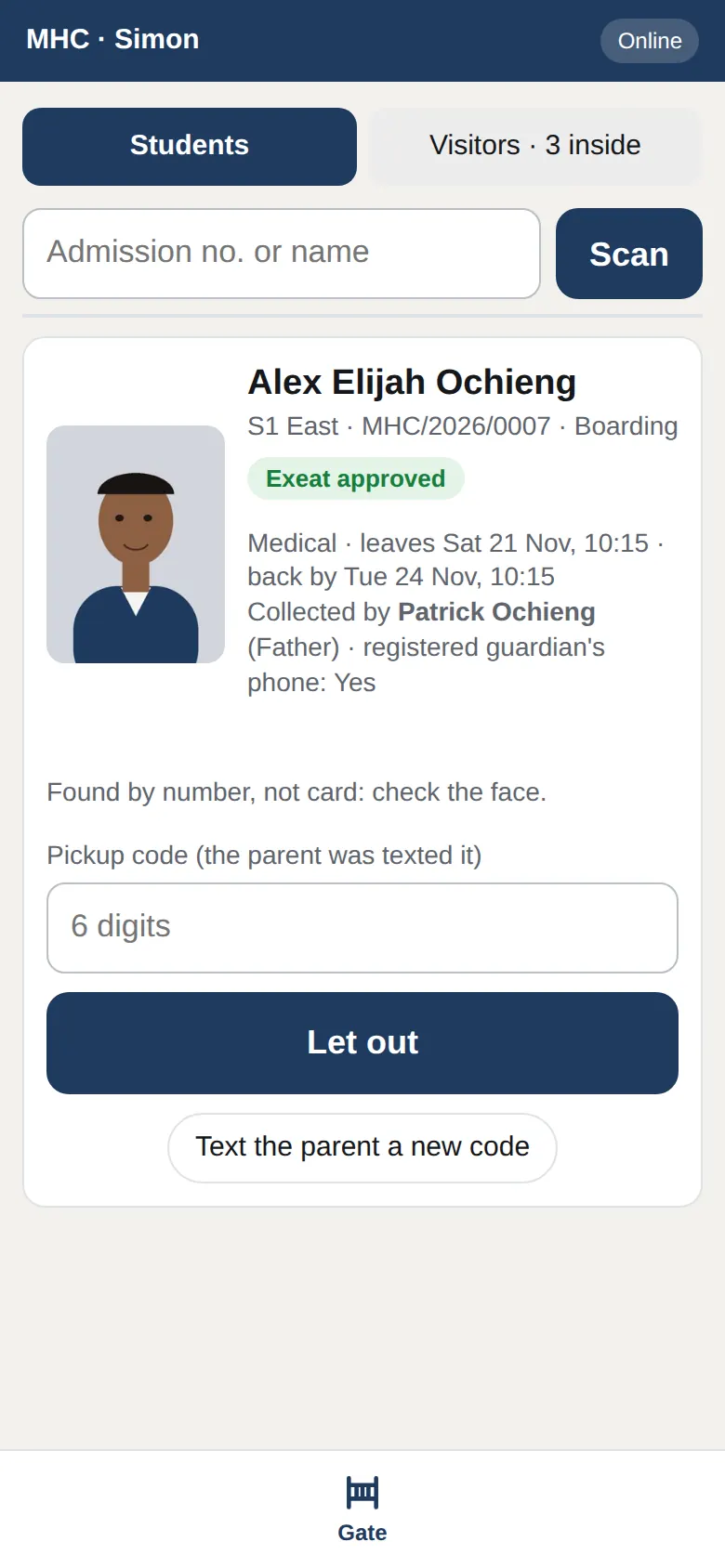
A student with an approved exeat: who is collecting, and the box for the pickup code the parent was texted
Letting a student out with the pickup code.

The classroom · class teacher

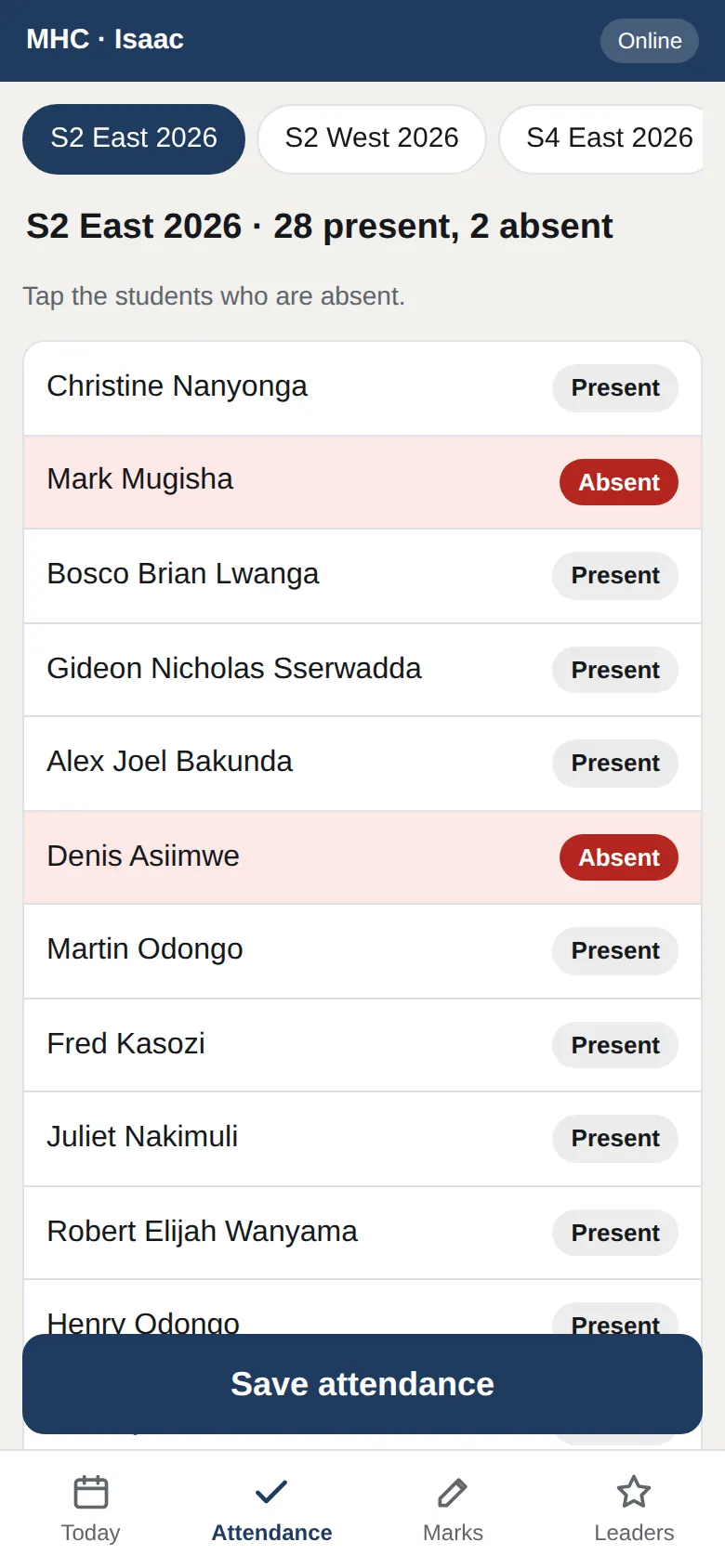
The register is a tap on the teacher's own phone.

Every student is marked present. The teacher taps the ones who are absent and saves. No computer, no register book to carry to the office.

If the network drops, the register is kept on the phone and sent when it comes back. Saving it twice never counts it twice.

  • The staff app is 36 KB on its first visit and 4 KB after that.
  • Marks, today's lessons and lesson records are in the same app.
A class register on a phone: absent students in red, everyone else present
Tap the absent ones. Everyone else is present.

Lessons · Director of Studies

The timetable is worked out for you, not drawn by hand.

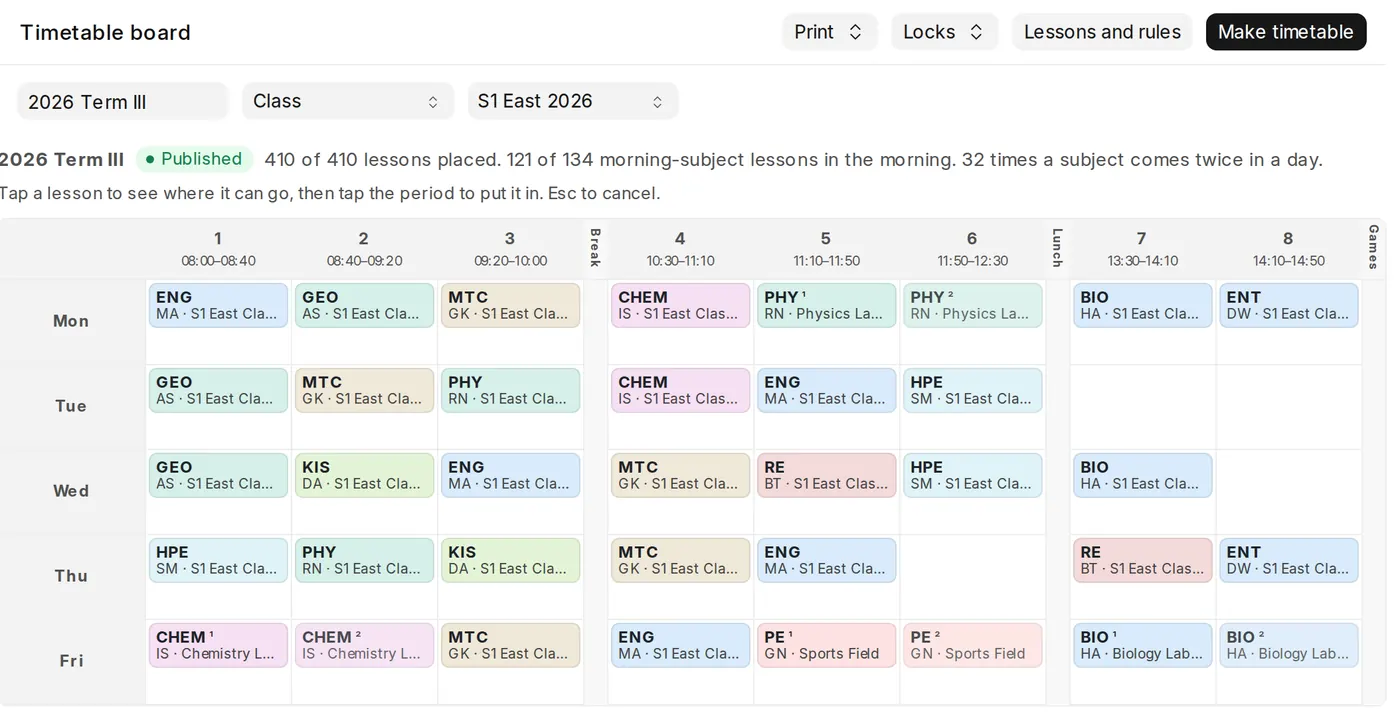
The DOS enters who teaches what, how many lessons a week, doubles, rooms and the days a teacher is away. The system places every lesson so that no teacher, class or room is booked twice. Moving one lesson is a tap.

Each teacher sees their own day on their phone. When a teacher is away on a school trip, cover for their lessons is planned. Exam timetables count their clashes before they are printed.

The timetable board: a class's week, filled in by the system
A class's week, made by the system.

Break · canteen

Pocket money without the cash box.

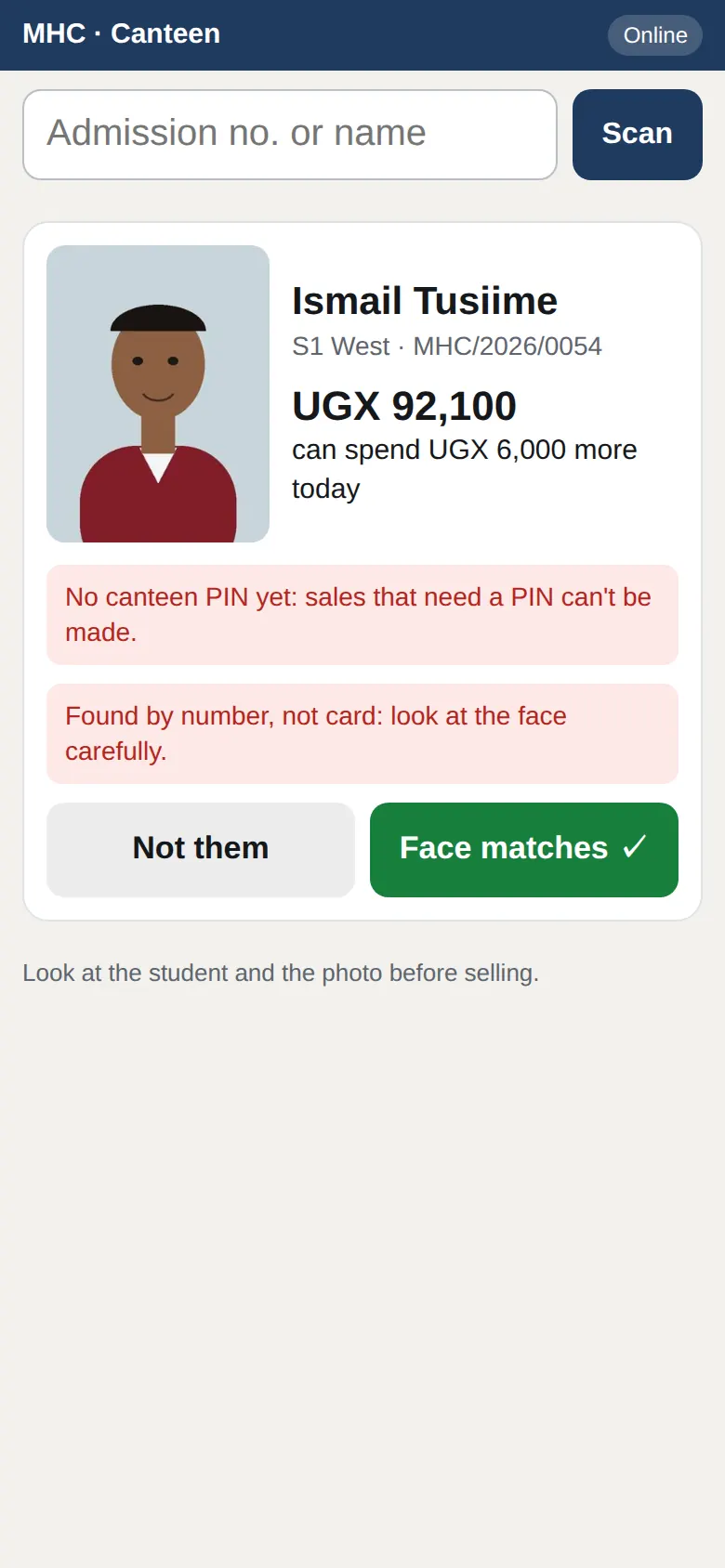
Parents deposit pocket money with the school, and the canteen sells against it. The attendant scans the student's card and checks the face against the photo first. Then they tap what the student asks for.

A bigger sale needs the student's PIN. Each student has a daily limit, and unusual spending is reported to the matron. A parent can stop their child's spending from their phone, for example while a lost card is replaced.

  • The till keeps working through a network drop for small sales.
  • The balances held always add up to the pocket money the school holds.
The canteen till: the student's photo and balance, with a face check before selling
The face check comes before the sale.

The bursar's office

SchoolPay payments post themselves.

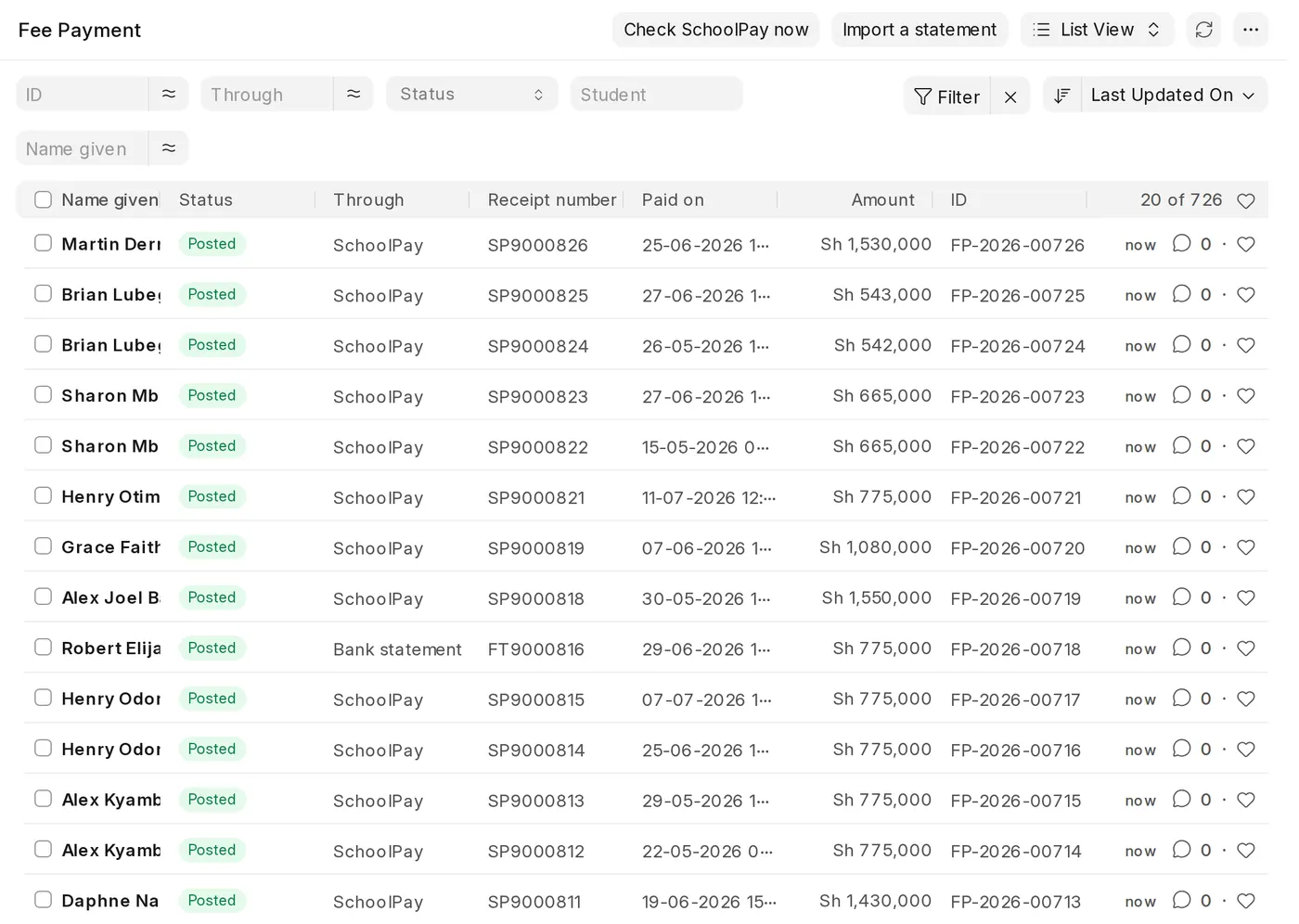
Parents keep paying through SchoolPay as they do today. Each payment comes into the system on its own, is matched to the child and receipted by SMS. Hourly and nightly checks catch anything missed. Bank and mobile money statements import in one go.

At the start of term the whole school is billed in one step, with concessions and extra charges. Balances and exam clearance are always up to date. A reminder goes to every parent who owes in one tap.

Payments from SchoolPay and statements, matched to students and posted
Payments from SchoolPay, matched and posted.

Clubs and games · patrons and student leaders

Student life is part of the record too.

Prefects and club leaders take registers, write duty reports and minutes, and ask for events and trips. Each request goes up the school's own approval chain. Merits go to students, clubs and houses, and the house league keeps score.

An approved trip bills the students who are going, texts the parents for consent, plans cover for the lessons missed, and prints the Ministry's checklist. On the day, the bus roll is taken on a phone.

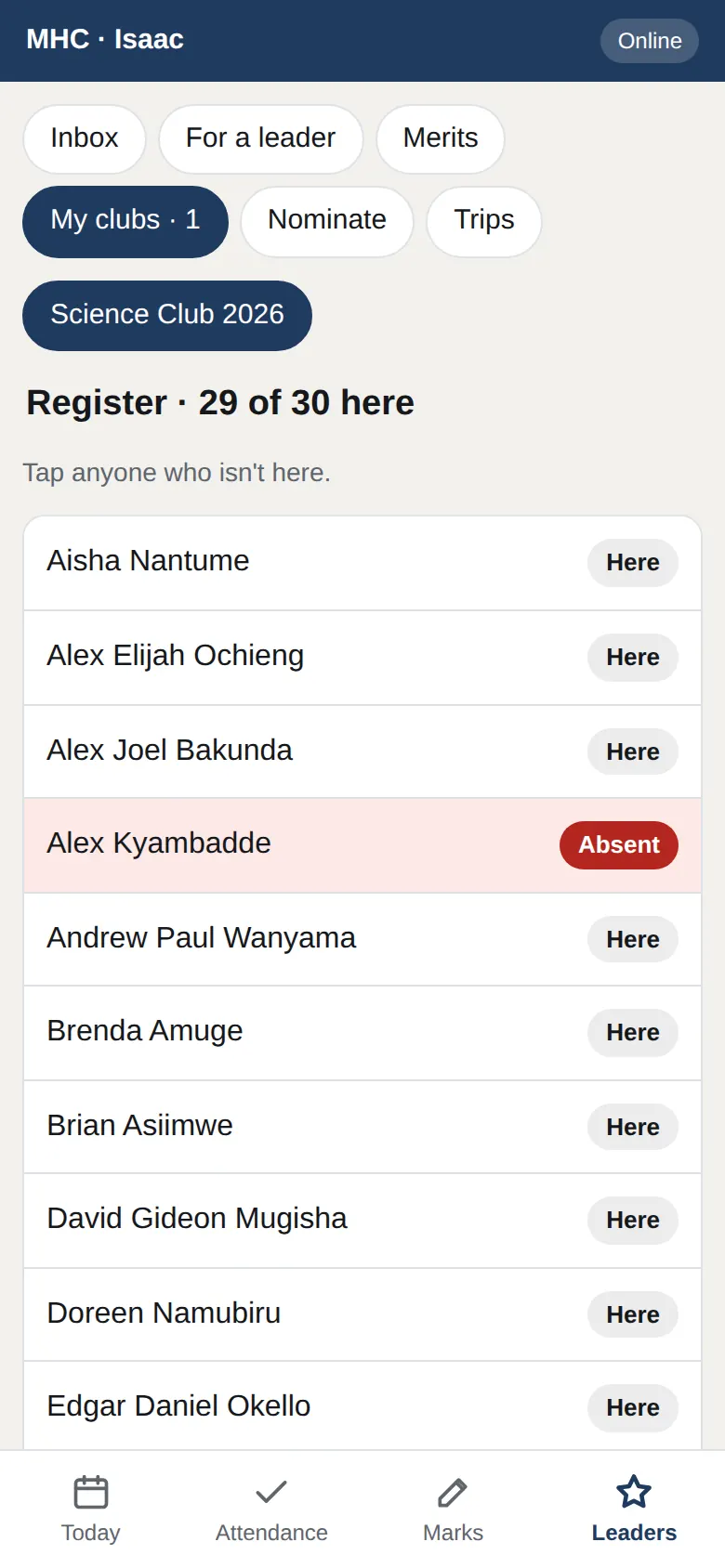
A club register on the patron's phone: tap anyone who isn't here
The Science Club's register on the patron's phone.

At home · parents

Parents see their child's school on their phone.

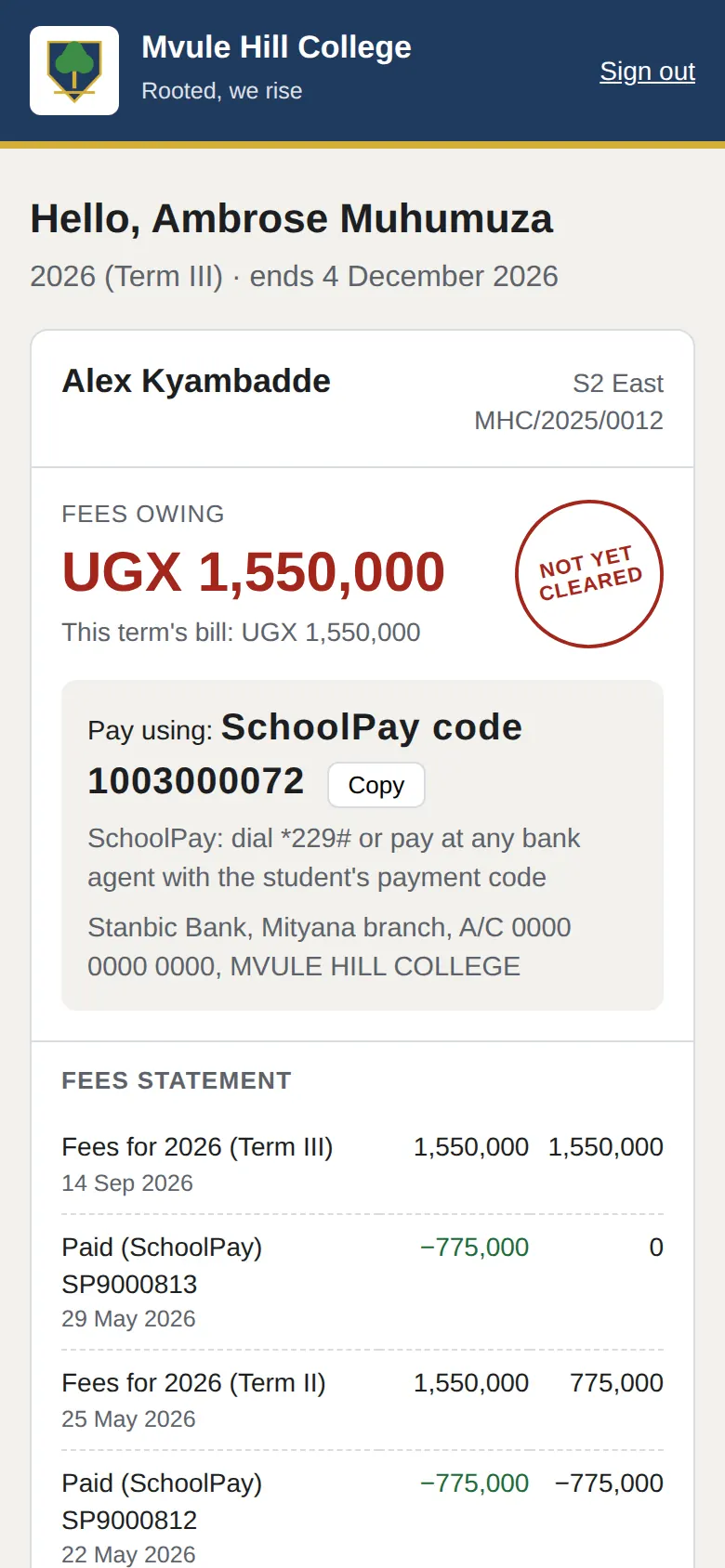
The parents' page opens in any phone's browser, with nothing to install. Parents sign in with a code texted to the number the school has for them. They see fees, how to pay, receipts, report cards and attendance.

They get a text when it matters: a payment received, an exeat, a visit to the sick bay, an award, a trip. Fewer calls to the office, and no argument about what was paid.

The parents' page on a phone: fees owing, the SchoolPay code and the fees statement
Fees, the SchoolPay code and the statement.

The dormitory · matron and warden

Roll call knows who is away.

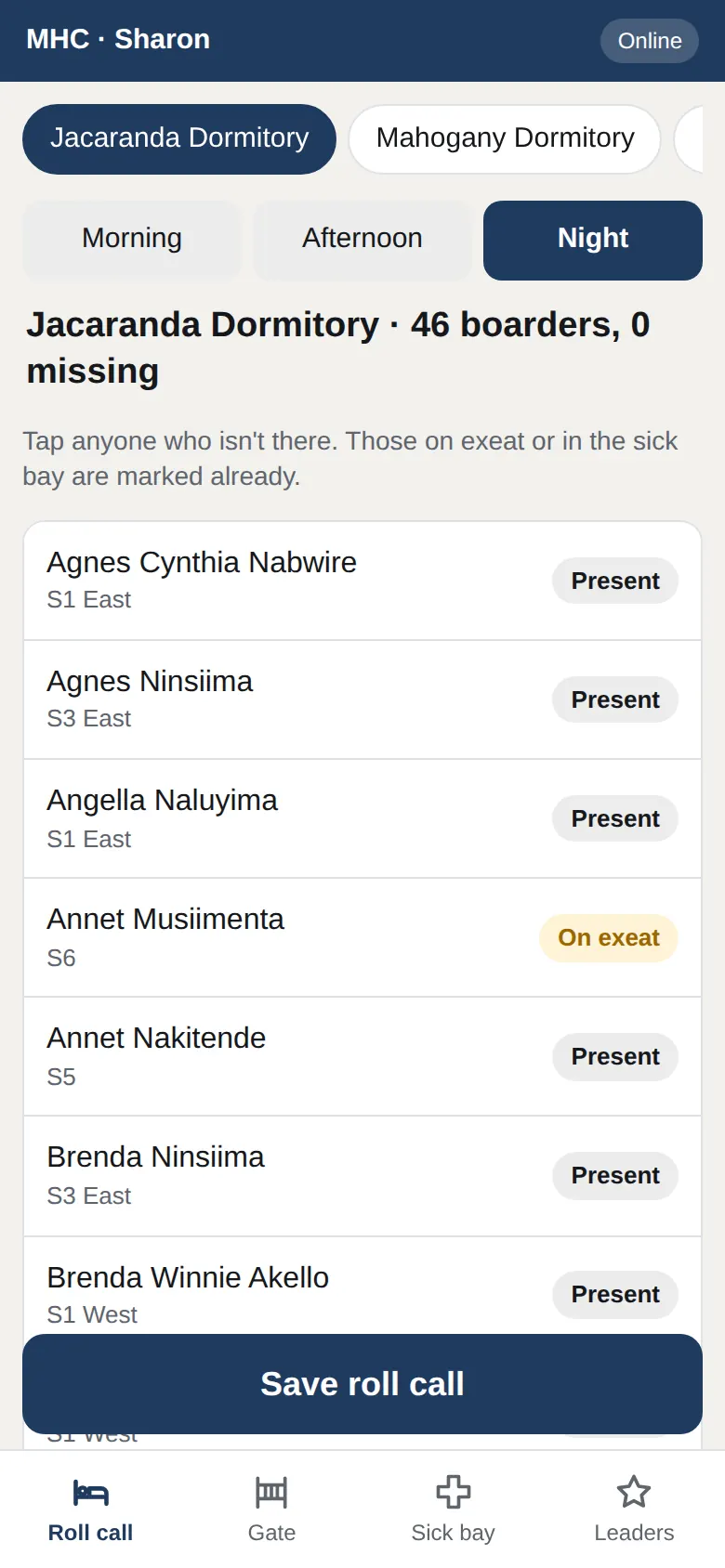
The matron takes the night roll call on the staff app. Boarders on an exeat, in the sick bay or on a trip are already marked, so "missing" means missing.

Sick bay visits, discipline cases and counselling are kept here too. Counselling notes stay private to the counsellor.

Night roll call for a dormitory on the matron's phone
Night roll call for one dormitory.

At home · the head teacher

The whole school on one page.

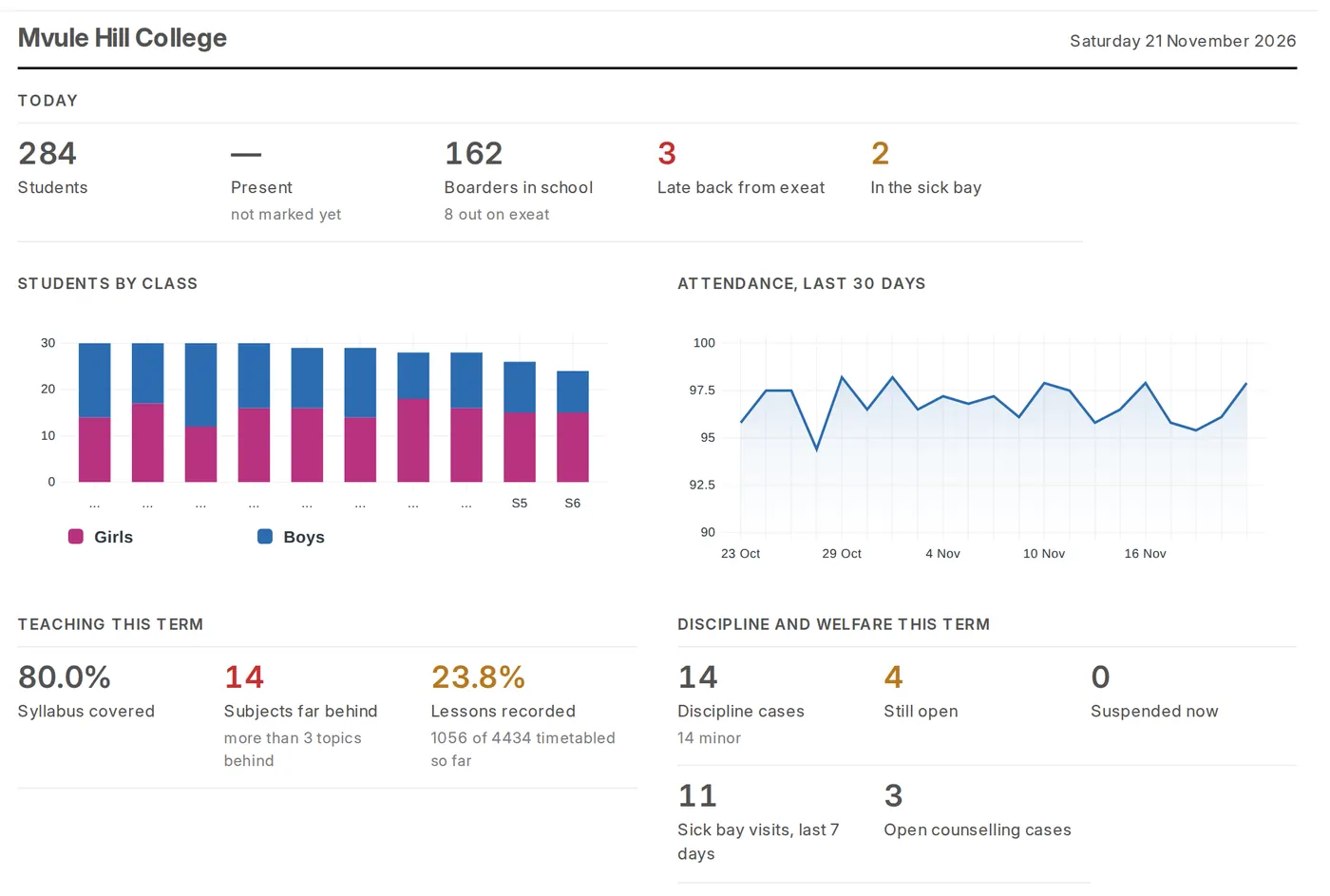
Who is in school today, who is in the sick bay, fees billed against fees paid, syllabus coverage, lessons taught, discipline and the house league. Each member of staff sees the part that is theirs.

Requests and trips wait for approval in the staff app on the phone, not in a pile on a desk.

The school dashboard: attendance, fees, teaching and welfare at a glance
The head teacher's dashboard.

And the days that come once a month, a term, a year

End of the month

Payroll

Salaries with PAYE, NSSF and Local Service Tax worked out, payslips in the school's name, and the monthly returns ready. Missing TIN numbers are named before you file.

End of term

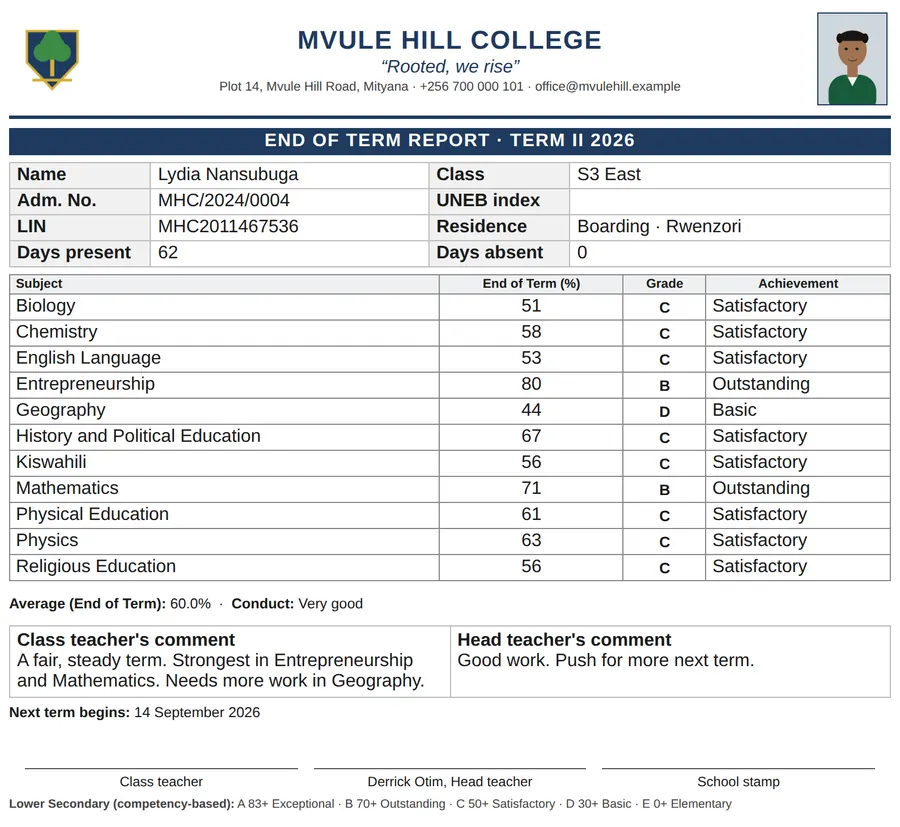
Report cards for a whole class at once

With the student's photo, marks graded the right way for each level, comments, attendance and, if the school wants, posts, merits and awards. PLE aggregates and divisions, UACE points, and UNEB registration checked before you submit.

A secondary report card with photo, marks, grades and comments

End of the year

The rollover

Every student moves up, repeats or leaves in one step, with the new year's classes, terms and fees ready. Leavers' records stay in the system.

Made for a Ugandan school, not adapted to one

Every post, award, approval chain, text to parents, fee and report card section is the school's own setting. We start you with Ugandan defaults for your levels; you change what is different at your school.

Your first term with R-TECK School

We set it up with you, not for you to work out. This is how a school starts, laid out like the timetable it will soon have.

WhenWhat happensWho
Visit A demo on your own phones. We show the demo school and look at how you work today: your fees, your SchoolPay code, your report card. Proprietor, head teacher, bursar, DOS
Week 1 Your school's own system. Its own web address and database, with your name, crest, colours, levels, terms, classes and subjects. Your records come in from Excel: students with their parents and SchoolPay codes, staff with their pay details. R-TECK, with your secretary and bursar
Week 2 Training where the work happens. The office on its computers. Teachers on their phones at a staff meeting. The gate, the canteen and the matron on theirs. The head teacher sets the school's own rules. Every member of staff
Week 3 Live. The term is billed, SchoolPay and texts are switched on, and parents get a letter and a text about their page. A checklist in your system shows what is done and what is left. Head teacher and bursar, R-TECK on call
End of term The first report cards, together. We are with you for the first report cards and the first year-end rollover. DOS, class teachers, R-TECK

Each school has its own site, its own data and its own logins. R-TECK hosts it, backs it up and keeps it up to date.

Questions head teachers ask

Do teachers need computers?
No. Teachers use the staff app on their own phones for attendance, marks and lessons. The office (bursar, secretary, DOS) is best on a computer.
What if the network is bad?
The phone apps open in a few seconds on slow 3G and keep working when the network drops. The work is sent when it comes back, and nothing is saved twice.
Does it work for primary schools?
Yes: nursery (Baby, Middle and Top Class), P1 to P7 with D1 to F9 grading, the PLE aggregate and division, and PLE registration. A school can be any mix of nursery, primary, O level and A level.
How do parents pay?
Through SchoolPay, as they do today. Payments come into the system on their own, are matched to the child and receipted by SMS.
Do parents need to install an app?
No. The parents' page opens in any phone's browser. Parents sign in with a code texted to the number the school has for them.
Can students or parents upload photos?
No. Only staff take students' photos, so the photo on the ID card and the report card is always one the school took.
What about our existing records?
Students (with parents and SchoolPay codes) and staff (with pay details) come in from Excel. Importing again updates the records instead of making copies.
Is our data kept apart from other schools'?
Yes. Each school has its own site, database, logins and web address.
The R-TECK School crest

See it on your own phones

Call or WhatsApp us for a demo at your school. Bring your bursar and your DOS: the demo starts from how they work today.

Save our contact · rodney@rteckuganda.com · +256 752 975 027